Cancel or Modify Recurring Orders
Use this page as the canonical policy for order cancellation behavior.
What You Can Cancel by Order Stage
1) While order status is Review
You can cancel the order completely.
2) After the order leaves Review (accepted by ClearSKY)
Full cancellation is no longer available. This is because production costs are already committed after acceptance.
3) Recurring orders after acceptance
You can still cancel the next renewal (stop recurrence), but this does not remove coverage already created in the current or previous cycle(s).
Where to Cancel
- Dashboard: My Orders actions menu.
- API:
DELETE /api/tasking/orders/cancel
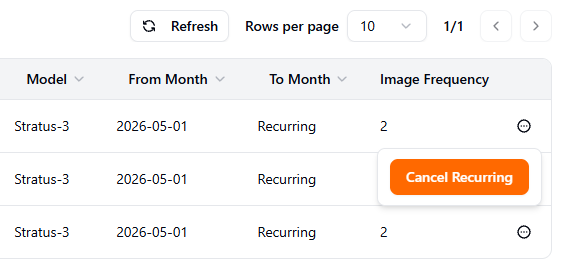
Dashboard action: use Cancel Recurring from the My Orders actions menu.
Monthly Cutoff Rule (UTC)
Recurring orders are calendar-month based. In practice, recurring means the order is set to renew in the next month. To stop next-month renewal, cancel recurring before 00:00 UTC on the first day of the next month.
Example:
- To prevent renewal for July 2026, cancel recurring before
2026-07-01 00:00 UTC.
If canceled after this cutoff, the next month has already started and will proceed.
Pricing Impact Across Orders
Canceling an order can change monthly accumulated spend, which can change spend-tier pricing for other orders in the same month.
Example:
- You place Order A, then place Order B.
- Order B is priced with a higher-tier discount because accumulated spend includes Order A.
- If Order A is fully canceled while still in Review, accumulated spend drops and Order B pricing can be affected.
For tier mechanics, see Monthly spend tiers.
What "Modify" Means
After acceptance, in-place editing of an existing order is not supported. If settings are wrong, create a corrected order and cancel what is still eligible for cancellation.
For subscription-plan cancellation policy, see Subscriptions and plans.