Storage and Extra Requests
ClearSKY includes baseline storage and retrieval capacity with each order. Extra charges apply only when you extend retention or exceed included download processing.
What Is Included in Every Order
- Included storage runs through the end of the following calendar month for data produced in each month.
- Example: data produced in May is retained through June 30 at no extra storage charge.
- Included processing units are enough to download the produced data once.
For recurring orders, this same rule applies continuously month by month: older produced data expires on the same rolling schedule while new data is produced.
Processing units are mainly relevant when you do repeat downloads or request additional export variants.
For the full credit model, see Order credits vs processing units.
Extra Storage Fees
If you need retention beyond the included free window, set a higher StorageMonths value when creating the order.
- Price:
EUR 0.00001 per km2 per month - Billing basis: ordered imagery area x extra storage months
Quick formula:
Extra storage cost = area_km2 x extra_months x 0.00001 EUR
Extra Processing Request Fees
If included processing units are exhausted, you can purchase more for additional downloads.
- Coverage per unit: up to
10 km2of imagery per processing unit - Top-up price:
EUR 5.0per2,500processing units
Processing-unit top-ups are most commonly needed for:
- Re-downloading the same order output multiple times
- Exporting the same data in multiple variants (for example EPSG/resolution/band differences)
- Running repeated download jobs in automated pipelines
Storage and Processing Are Separate
Storage duration controls how long data remains downloadable. Processing units control how much download processing you can run.
Even with processing units remaining, expired storage can still prevent downloads.
Where to Configure
- In dashboard order flow: Storage months and API requests fields.
- In API order flow:
StorageMonthsandApiRequests, both set when creating the order.
In the dashboard, these options are under Show advanced settings in the order configure panel.
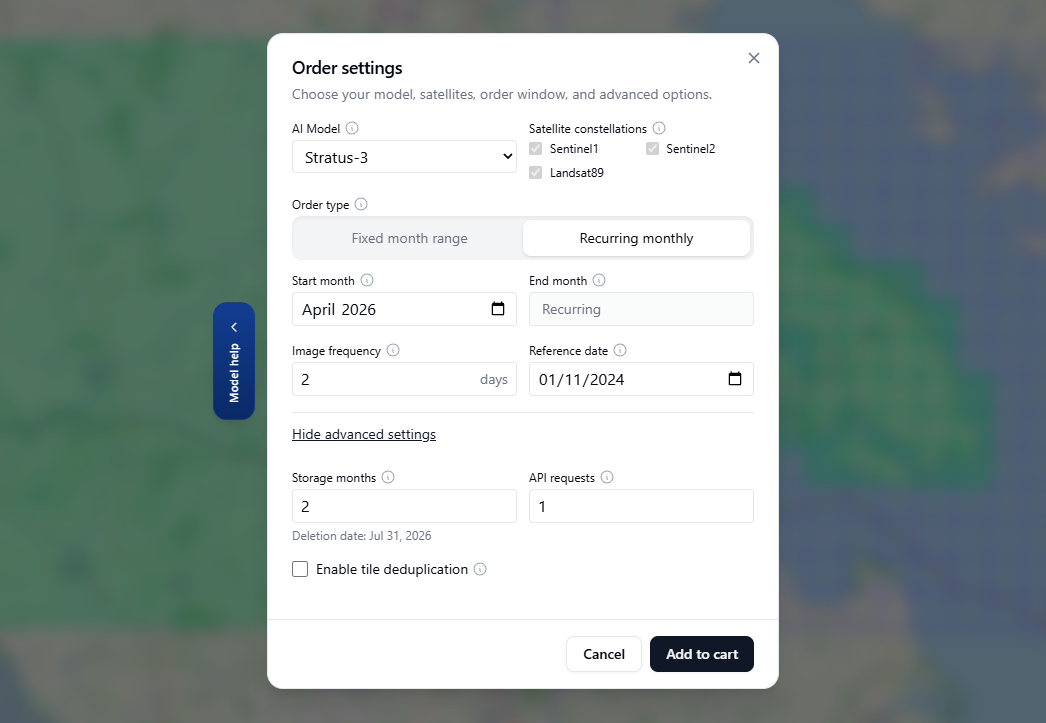
Screenshot: Order Settings - Advanced with Storage Months and API Requests options.
For UI/API guidance, see Create an Order in the Dashboard and Create an Order with the API.
Pricing Notes
Account terms may vary. For account-specific totals and current checkout estimates, use the dashboard estimate flow or contact support.