CRS / EPSG / UTM Guidance
Projection choice is part of every download request and has direct impact on output quality and downstream consistency.
Where You Set CRS/EPSG
- In the dashboard, choose EPSG Projection on the download form.
- In API downloads, set
EpsgProjectionin the request payload. - Keep the same EPSG across a time-series when you want stable pixel alignment over time.
Composite and tile/minitile download workflows support UTM EPSG handling through:
- explicit UTM EPSGs (
326xx/327xx), or 47000(auto-EPSG mode), where ClearSKY selects the most suitable UTM EPSG for the request.
Recommended Default for Highest Quality
Prefer UTM EPSG outputs (326xx / 327xx) for most quality-sensitive workflows.
Why this is usually best:
- Better geometric consistency for local/regional AOIs.
- More predictable reprojection behavior.
- Less avoidable resampling than broad/global projections.
Auto-EPSG Mode (47000)
Use 47000 when you want ClearSKY to choose the most suitable UTM EPSG automatically.
This is useful when you want UTM-quality outputs without manually selecting a zone per request.
Cross-Zone AOIs (UTM Transition Areas)
If your AOI crosses UTM zone boundaries, decide these outcomes first:
- Do you want one complete output footprint, or strict single-zone-only data?
- Is exact pixel size in meters more important than minimizing geometric warping effects?
- Should downstream processing treat zone boundaries as one merged surface or separate zone-faithful areas?
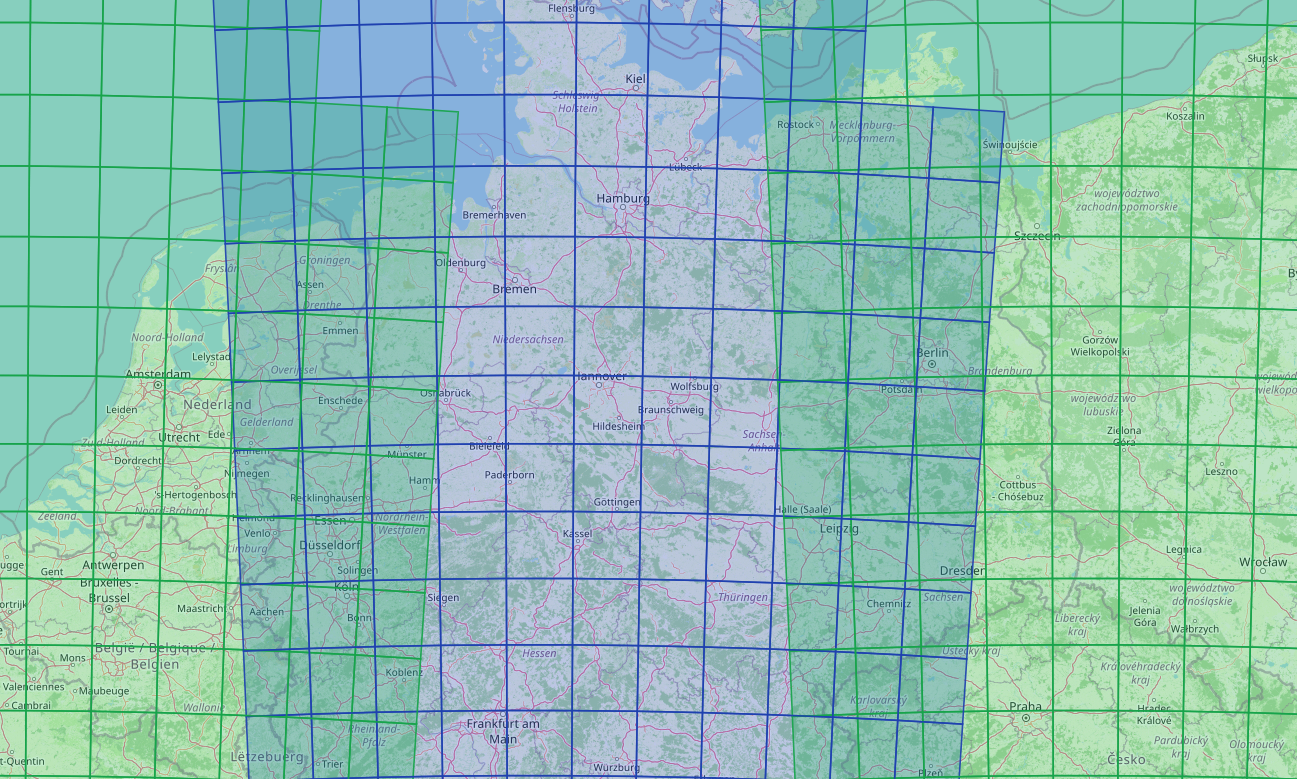
Screenshot: three neighboring UTM zones with overlapping ClearSKY tiles near transition boundaries.
UTM-Specific API Controls
UtmDataSelectionMode and UtmGridForcePixelResolutionSize are relevant for UTM-aware output behavior, including explicit UTM EPSGs and auto-EPSG (47000) workflows.
UtmDataSelectionMode
| Value | Behavior | Use when |
|---|---|---|
single_utm_fully_covered | Strictly requires polygon coverage from data in the requested EPSG only. No cross-zone fill. | You want strict zone purity and do not want pixels reprojected from neighboring zones. |
combined_utm | Uses requested-EPSG pixels first, then fills uncovered parts with pixels reprojected from other EPSGs into the requested EPSG. | You want one complete output for AOIs crossing UTM boundaries. |
single_utm | Uses only requested-EPSG pixels, but keeps output array dimensions aligned to the combined_utm footprint (without filling from other EPSGs). | You want requested-zone-only pixels while keeping a predictable output footprint. |
UtmGridForcePixelResolutionSize
This flag only affects results when reprojection is involved.
| Value | Behavior |
|---|---|
true | Forces pixel size to remain exactly Resolution meters. Reprojection effects show up as geometric warping (for example slight twisting). |
false | Allows pixel size to deviate slightly from Resolution (for example 9.99 m vs 10 m). Reprojection effects show up as slight pixel-size differences. |
Practical Workflow
- Start with either an explicit UTM EPSG (
326xx/327xx) or auto-EPSG (47000) for the main area. - Run availability and estimate with the exact same
EpsgProjection,UtmDataSelectionMode, and band/model settings you will use for download. - For AOIs near zone edges, test at least two mode combinations on a small sample before bulk runs.
- Lock projection and UTM-mode choices before production time-series jobs.
Visual Validation Tools
For zone-edge planning and tile context, use:
- tiles.clearsky.vision to inspect ClearSKY and Sentinel-2 tile layouts.
- Define an Area with Tiles and Minitiles Ordering for GUID-based selection workflows.
Related: Composite downloads and Tile and Minitile downloads.