Availability
The Orders - Availability page shows which of your orders still have data available for download.
It provides expiry details, filters, and an availability calendar for each order to help you plan downloads.
Availability Map
- The map highlights all active orders that still contain data.
- Clicking on an order highlights its footprint and lets you inspect availability.
- Expired orders (with no data left) are excluded by default.
Filter Options
Use the filter panel on the right to refine which orders are displayed:
- Date Range Slider: Adjust to show only orders active within the selected timeframe.
- Date Filter Mode: Choose between orders that fall fully within range or partially overlapping.
- Model: Filter by the cloud-removal model used.
- Recurrence: Show all, recurring, or one-time orders.
Availability Table
Each row represents an order with key details:
- Order GUID: Unique identifier for the order.
- Next Exp.: The next expiration date.
- Expiry Range: The time window for which data is available.
- Expired Range: Shows if parts of the order are already expired.
Availability Calendar
Clicking on an order (either from the list or the map) opens a calendar view of availability.
This view shows exactly which dates contain usable imagery.
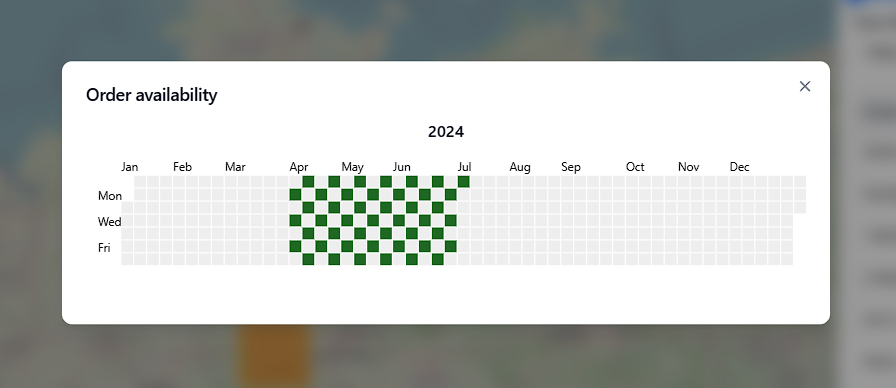
- Green squares = imagery available on that date.
- The calendar is organized by months across the top and days of the week along the side.
- This helps quickly check revisit frequency and gaps in coverage.
Expiry Rules
-
Historical Orders:
All data is deleted at the end of the following month, unless extended storage is purchased. -
Recurring Live Orders:
- Data produced in a given month is retained through the end of the following month.
- As recurring orders continue month to month, older data expires on this same rolling monthly rule while new dates continue to be added.
- If recurring is canceled before
00:00 UTCon the first day of the next month, the current month still completes and the next renewal does not start. - For canonical cancellation policy details, see Cancel or modify recurring orders.
The Availability page is the best way to track which imagery is ready today, and for how long it will remain available.